
Overview
The Overview page (Home) summarises your account. Partner, Partner risk, Partner group and Referrer users see it; Partner operators start from Payments instead.
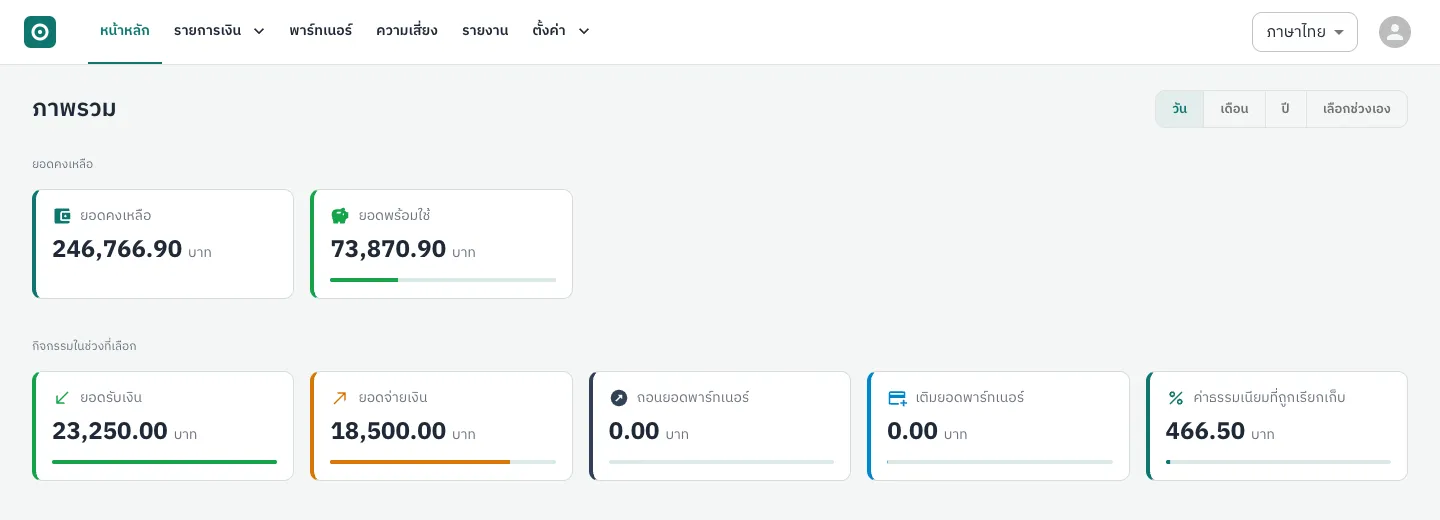
| Card | Meaning |
|---|---|
| Balance | All money in your partner account now |
| Available balance | Balance minus holds; usable for payouts and withdrawals |
| Pay-ins, payouts, withdrawals, add funds | Totals of completed items in the selected period |
| Fees charged | Fees your account paid in the period |
Choose the period with the day, month, year or custom-range buttons at the top right. Balances are always current and do not depend on the period.
Partner group users also get a table per partner (balance, available balance, pay-ins, payouts, fees) with a Download (CSV) button. Referrers: see Referrer pages.
What causes holds is explained in Balance, withdrawals and add funds.