
Pay-in lifecycle
A pay-in asks a payer to transfer money to you once. The platform tells the payer how much to pay and where, then matches the incoming money to the pay-in automatically.
Overview
Section titled “Overview” create ──► pending ──── payer transfers the exact amount ────► succeeded │ automatic matching │ ├── no money within the time limit ──► expired │ │ │ └── confirmed with a slip ──► succeeded │ └── canceled by you or the platform ──► canceledNames are the API status values. The console labels are in the status reference.
-
You create the pay-in
Your system calls
POST /v1/payinswith the payer, amount, your order reference (reference) and a webhook URL. The response contains:amount: what the payer must transfer (may include extra satang)paymentImage: the QR code or transfer card, andpayTo: the destination accountcheckoutUrl: a hosted payment page you can send the payer to
The new pay-in is pending (console: New). Field details are in Pay-ins (API).
-
The payer transfers
The payer scans the QR code with a banking app; the amount is already filled in. The QR code works for this pay-in only.
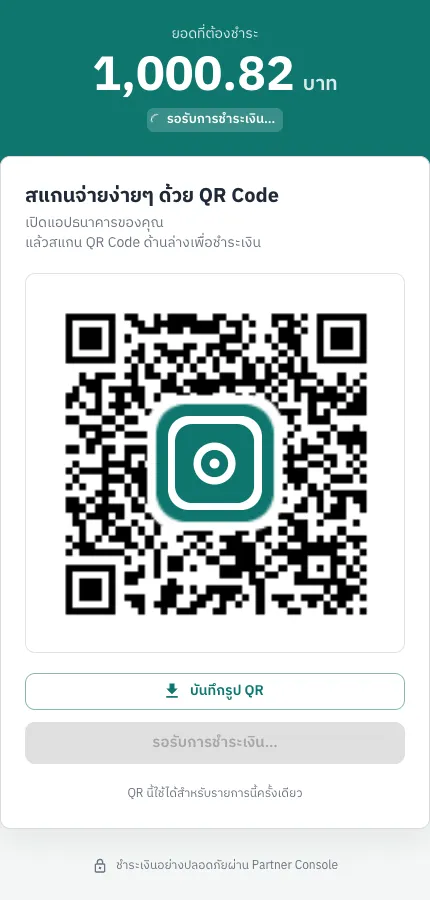
The payment page shows the bank, account number, recipient name and the amount to transfer. The payer must transfer this amount to the last satang, from their registered account.
-
Automatic matching
When the bank reports incoming money, the platform looks for a pending pay-in with exactly the same amount, then checks that the money came from that payer:
- QR payments: the sender name is compared with the payer’s Thai name, English name and aliases (titles, spaces and letter case are ignored, and names shortened by the bank still match). If the name does not match, part of the account number is compared instead.
- Bank transfers: part of the sender account number and the bank are compared.
-
Result
When matched, the pay-in becomes succeeded, the amount minus fees goes to your balance, and a
payin.succeededwebhook is sent. If the payer used the hosted page and you gave areturnUrl, the page sends the payer back to your site.
Amounts with extra satang
Section titled “Amounts with extra satang”To tell apart pay-ins of the same amount, the platform adds 0.01–0.99 THB to the amount to transfer. For a 1,000.00 THB pay-in, the payer might have to transfer 1,000.82 THB.
- In the console, your amount is the requested amount and the amount to pay is the transfer amount.
- In the API they are
requestedAmountandamount. - Whether your account uses extra satang, and who keeps it, depends on your fee plan. Ask support if unsure.
Timing
Section titled “Timing”| What | Value |
|---|---|
| Time to pay | 15 minutes from creation by default. The provider may set a different value for your account |
| Expiry check | About every 10 seconds |
| Pay-ins created 00:00–07:00 (Thailand time) | Move to expired after 07:00. Until then they can still be matched |
| Pending pay-ins per payer | One at a time; create a new one when the previous one has finished |
When the payer paid but the pay-in expired
Section titled “When the payer paid but the pay-in expired”The most common case: the payer transferred after the time limit, transferred a different amount, or paid from another account. An expired pay-in is no longer matched automatically. Resolve it with the transfer slip.
- Ask the payer for the transfer slip (the image from the banking app, with its verification QR code).
- Submit the slip in one of two ways:
- Console: a Partner operator user clicks Confirm partial amount on the pay-in. See Confirm with a slip.
- API:
POST /v1/payins/{id}/slip. See Slip verification.
- The platform verifies the slip with the bank. If it passes, the pay-in becomes succeeded and the usual
payin.succeededwebhook is sent.
The platform checks that:
- the QR code on the slip can be read and the slip has not been used before;
- the recipient on the slip is the account the payer was told to pay;
- the whole-baht amount matches the pay-in (satang are ignored);
- the sender on the slip is the payer of the pay-in.
This works only for pending or expired pay-ins. If the pay-in was canceled, contact support with the UUID and the slip.
Canceling a pay-in
Section titled “Canceling a pay-in”You can cancel a pending or expired pay-in with POST /v1/payins/{id}/cancel or the Cancel button on the Pay-ins page. A canceled pay-in can no longer be matched.
- Canceling in the console sends a webhook.
- Canceling through the API does not, because you already have the response.
Cancel only when you are sure the payer will not pay, for example when the customer canceled the order. If they pay after the cancellation, support has to review it case by case.
Common errors when creating a pay-in
Section titled “Common errors when creating a pay-in”| API code | Cause | What to do |
|---|---|---|
pending_payin_exists | The payer already has a pending pay-in | Wait for it to finish, or cancel it |
amount_below_minimum / amount_above_maximum | Outside your per-payment limits | Change the amount, or ask for new limits |
payer_inactive | The payer is inactive | Activate the payer on the Payers page |
payer_blocked | The payer is on the blocked list | Contact support |
maintenance | The platform or a bank is under maintenance | Try again later |
payins_disabled | Pay-ins are turned off for your account | Contact support |
The full list is in Errors.