
Troubleshooting
Reference ID in error messages
Section titled “Reference ID in error messages”Console errors look like this:
[error code] message รหัสอ้างอิง: req_xxxxxxxxxxxxxxxxxxxxxxxx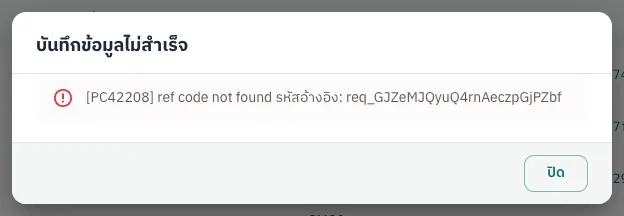
The error code is a short system prefix plus 5 digits; the first three digits are the category (400 invalid data, 403 no permission, 422 a rule was not met, 500 system error). The reference ID (req_..., labelled รหัสอ้างอิง / Reference) identifies the request; copy it before closing the dialog and send it to support.
Common messages
Section titled “Common messages”| Message | Cause | What to do |
|---|---|---|
| That email or password isn’t right. | Wrong credentials, or sign-in paused after several failures | Check and retry; after many failures wait up to 15 minutes |
| Too many wrong codes. Try again in … | More than 5 wrong 2FA codes | Wait for the time shown |
| Forbidden resource | Your role cannot do this | See Roles |
| ref code not found | Unknown referral code | Fix or leave empty |
| Customer is invalid | Payer on the blocked list | Contact support |
| Exceed Balance / Existing Settlement is processing / Exceed daily settlement limit | Withdrawal rules | See Withdrawals |
| System is under maintenance | Platform or bank maintenance | Try later |
| Internal Server Error | System error | Retry; if it persists send the reference ID |
Paid but expired
Section titled “Paid but expired”Search Pay-ins with a wider date range, check the payer and amount, get the slip and confirm it with the slip. If that fails or the pay-in was canceled, send the UUID, slip and reference ID to support. Do not create a new pay-in for the same money.
Name mismatch
Section titled “Name mismatch”QR pay-ins match on the sender name. It fails when the payer pays from another person’s account, the registered name is spelled differently, or there is no English name. Confirm the current pay-in with a slip (it fails if the sender is someone else), fix the payer’s names on the Payers page or ask support for an alias, and tell payers to pay only from their registered account.
Failed payout
Section titled “Failed payout”Read the status message in the payout details. Fix the payer’s bank details if they are wrong, then cancel the payout through the API (the hold is released) and create a new one, or ask support to retry or cancel it. Ask support about payouts that stay In review for long.
2FA problems
Section titled “2FA problems”- Codes always rejected: set your phone’s time to automatic and use the next code.
- Locked out: wait for the time shown (max 15 minutes); the counter resets after 10 minutes without failures.
- Sent back to sign-in: the 5-minute code window expired; sign in again.
- Lost phone: use your saved key or ask support to reset 2FA.
Webhooks not received
Section titled “Webhooks not received”Check the callback history on the payment. If your server did not answer 2xx within 10 seconds, or the URL is not a public http/https address, fix it and click Send callback again.