
Withdrawals and add funds
Both pages are under Payments → Balances and are available to Partner users. How the balance changes is explained in Balance, withdrawals and add funds.
Partner withdrawals
Section titled “Partner withdrawals”-
Check your available balance on the Overview and that no request is still awaiting approval or processing.
-
Click Request withdrawal.
-
Enter the amount in THB (the withdrawal fee is deducted from it).
-
Under Paid to choose Bank account (bank, account holder, account number) or Crypto wallet (currency, network, wallet address).
-
Add a Note if needed and click Save.
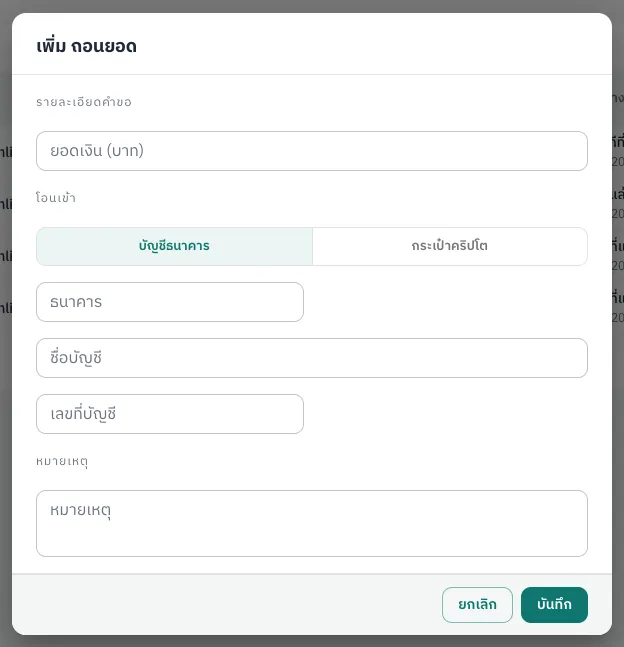
The request is Awaiting approval and the amount is held. Messages you may see: “Exceed Balance” (above available balance), “Existing Settlement is processing” (another request is unfinished), “Exceed daily settlement limit” (daily limit reached).
Partner add funds
Section titled “Partner add funds”- Transfer from your company account to the account the provider gave you, and keep the slip.
- Click Add funds, enter the amount and date, the source bank account, a note, upload the slip, and click Save.
The request is Awaiting approval (still editable). When the provider confirms the money arrived it becomes Completed and the amount minus the add-funds fee is added to your balance; otherwise it is Declined.